Guide for California agents
California AB 723: what a virtually staged listing photo must include
Since 1 January 2026, a digitally altered photo in a California listing advertisement needs two things: a statement that it was altered, and a way for the buyer to see the unaltered original. This page sets out what the law says, what your MLS adds, and how to meet both without redoing the photos.
This is a plain-English summary, not legal advice. The statute and MLS pages are linked at the end.
What the law requires
AB 723 added section 10140.8 to the Business and Professions Code. It applies to brokers and salespersons, and anyone acting for them, who use a digitally altered image in an advertisement or promotional material for the sale of a property.
- 1. A disclosure on or next to the image. A statement that the image has been altered, “reasonably conspicuous and located on or adjacent to the image”.
- 2. A way to see the original. The disclosure must include a link, URL or QR code to a publicly accessible site that clearly identifies the unaltered image, with wording that says the unaltered images can be seen there.
- 3. On your own website, the originals themselves. Where the posting is on a site the agent or broker controls, the unaltered versions must be included in the posting, or linked from it with the disclosure saying so.
What counts as “digitally altered”
An image altered with photo editing software or artificial intelligence to add, remove or change elements of the property. The statute’s list is long and not exhaustive: fixtures, furniture, appliances, flooring, walls, paint colour, hardscape, landscape, the facade, floor plans, and things outside the property or visible from it, such as streetlights, utility poles, the view through a window and neighbouring properties.
Not covered: lighting, sharpening, white balance, colour correction, angle, straightening, cropping, exposure, and other common adjustments that do not change how the property is represented.
Virtual staging is squarely inside the definition: it adds furniture. The question the law doesn’t ask, but your MLS does, is whether the staging tool changed anything else.
What the MLS rules add
- CRMLS (rule 11.5(c)): users may not alter photos to modify structural elements, flooring, walls, hardscape or views, unless the property will be delivered that way at close of escrow. Virtually staged photos must be labelled as such, the original unaltered photo should be included, and violations fall under the citation policy.
- SDMLS: the image must be clearly disclosed as digitally altered, the unaltered original must be available and paired with it, and vendors may not remove or obscure the indicators. Participants stay responsible even when a photographer or staging vendor did the work.
Other MLSs have their own instructions for labelling and pairing images. Check yours before uploading.
A checklist for each staged photo
- 1. Caption it, on or next to the image. For staging: “Virtually staged. Some elements have been digitally added.”
- 2. Keep the unaltered original and publish it: in the listing’s photo set, on your site, or at a link or QR code the caption points to.
- 3. Say in the caption that the original can be seen there.
- 4. Confirm the staging only added furniture and decor. If walls, floors, windows, fixtures or the view changed, the photo breaks CRMLS rule 11.5(c) whatever the caption says.
- 5. Follow your MLS’s pairing instructions so the original and the staged photo stay together in feeds.
How a Proven Staging photo meets each point
Every photo comes as a pack built around this checklist:
- The staged photo with a “Virtually staged” label, for point 1.
- Your unaltered original, untouched, for points 2 and 3.
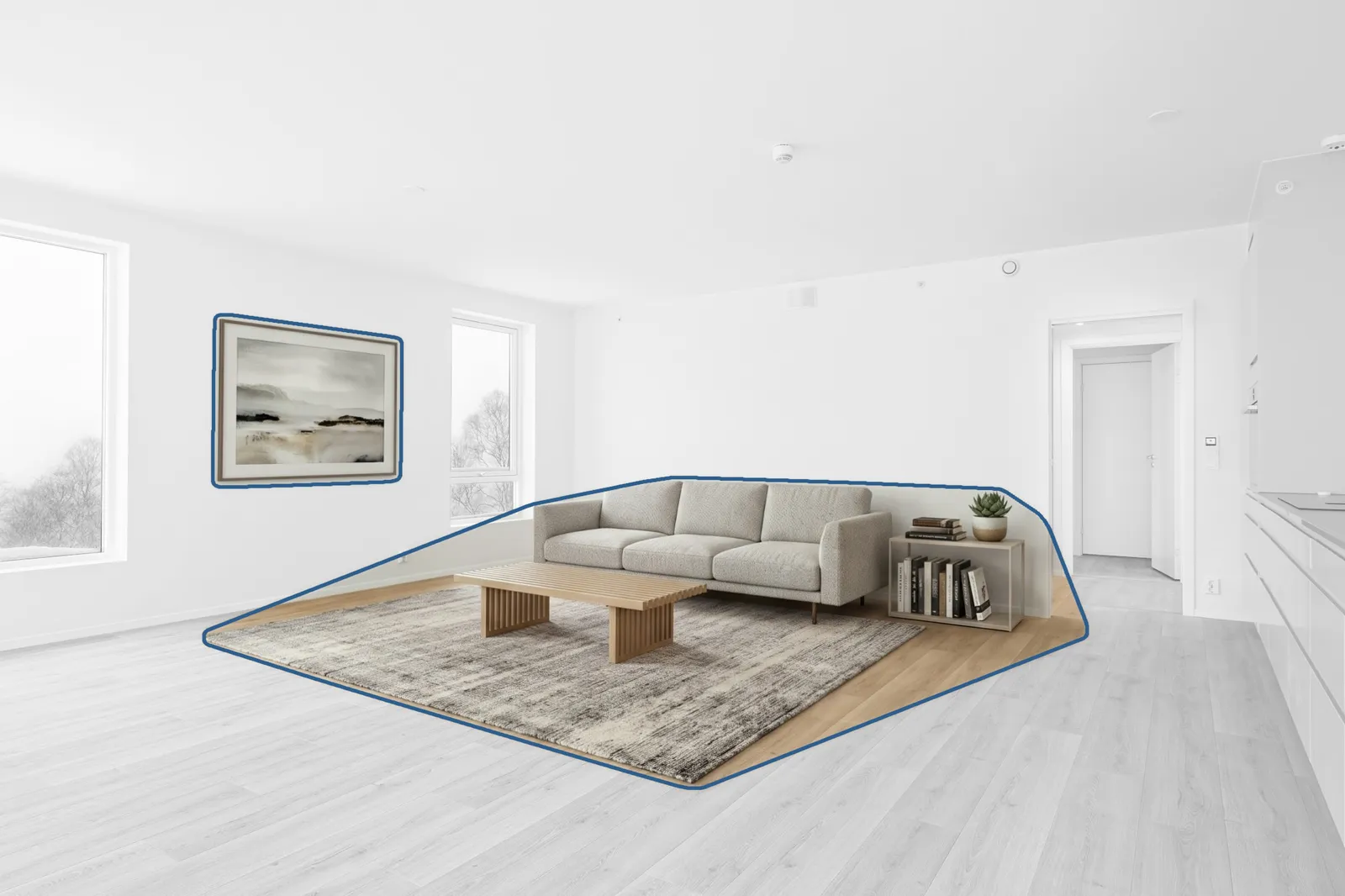
- A change map that outlines what was added and shows everything else came from your original, pixel for pixel, for point 4. The staged photo is checked against the original before it is sent, and if the tool changed the property, the original is put back.
Stage 3 listing photos free
Questions agents ask
Does AB 723 ban virtual staging?
No. It allows digitally altered images in listing advertising as long as the alteration is disclosed on or next to the image and the unaltered original is available through a link, URL or QR code. Some MLS rules go further and limit what may be altered.
Does the disclosure have to be written on the photo itself?
The statute says the statement must be “reasonably conspicuous and located on or adjacent to the image”, so a caption next to the photo is enough. A label on the image works too, as long as it stays with the image wherever it is displayed. Check your MLS’s own instructions, which may fix where the label goes.
What wording should the disclosure use?
The law doesn’t fix the words. It requires a statement that the image has been altered and language saying the unaltered images can be seen at the linked location. The San Diego Association of Realtors suggests “Virtually Staged. Some elements have been digitally added.” for staging.
Do I have to show the original photo?
Yes, you have to make it available. In any advertisement the disclosure must include a link, URL or QR code to a publicly accessible site that clearly identifies the unaltered image. On a website you control, the unaltered versions must be included in the posting or linked from it.
What if the staging tool changed the walls or floor as well as adding furniture?
Under AB 723 that is still a digitally altered image and needs the same disclosure. Under CRMLS rules it is a problem in itself: users may not alter photos to modify structural elements, flooring, walls, hardscape or views unless the property will be delivered that way. That is why it matters to know exactly what the tool changed, not just that it staged the room.
What happens if I don’t disclose?
Section 10140.8 sits inside California’s real estate licensing law, and willful violations of that law are a misdemeanor. MLSs add their own enforcement: CRMLS violations fall under its citation policy, and SDMLS says failure to comply may lead to compliance action or suspension of data access.
Sources
- Business and Professions Code section 10140.8 (official text)
- SDMLS: AB 723 digitally altered images compliance
- San Diego Association of Realtors: Are your listing photos compliant?
- Open Homes: the text of subdivisions (a) and (b) with commentary
Checked 3 November 2026. Laws and MLS rules change; confirm with your broker or MLS.